
Claude’s 200K context window already felt big.
For normal writing, planning, and research, that was usually enough. But when you are coding with Claude Code, the conversation can fill up faster than you expect.
Claude is not just replying to prompts as usual. With coding, it is reading files, editing code, checking errors, remembering instructions, and following the history of what has already been done.
So when the session gets compacted, the issue is that Claude may continue with a thinner version of the project history. It may remember the general direction, but lose some of the small decisions that actually matter in development.
That is where mistakes can start.
A forgotten instruction can lead to the wrong file being edited. A lost decision can lead to duplicate code. A weak memory of previous errors can make debugging messy again.
So the real benefit of a bigger context window is not just longer chats but better continuity while working on real projects.
This is also why having a clear AI coding workflow is crucial. A bigger context window helps, but your process still needs structure.
First, The Caveat
Before we make this sound bigger than it is, it is important to be clear about one thing.
The 1 million-token context window does not mean every Claude user now gets 1 million tokens everywhere.
That’s not how it works.
The limit depends on where you are using Claude, the model you are using, and the plan or platform you are on. Claude chat, Claude Code, and the Claude API don’t always have the exact same limits.
So if someone is using Claude in the normal chat interface, their experience may not be the same as someone using Claude Code for development work.
That is why this article is not really about saying, “Claude now has 1 million tokens for everyone.”
The only truth here is that Claude’s context window has expanded in important places, especially for developer workflows like Claude Code and supported API use.
And for people who use Claude to code, debug, review files, and work through long projects, that change matters.
Because once you move beyond basic prompts and start using Claude like a real coding assistant, context stops being just a technical spec but becomes part of how reliable the work feels.
What A Context Window Actually Does
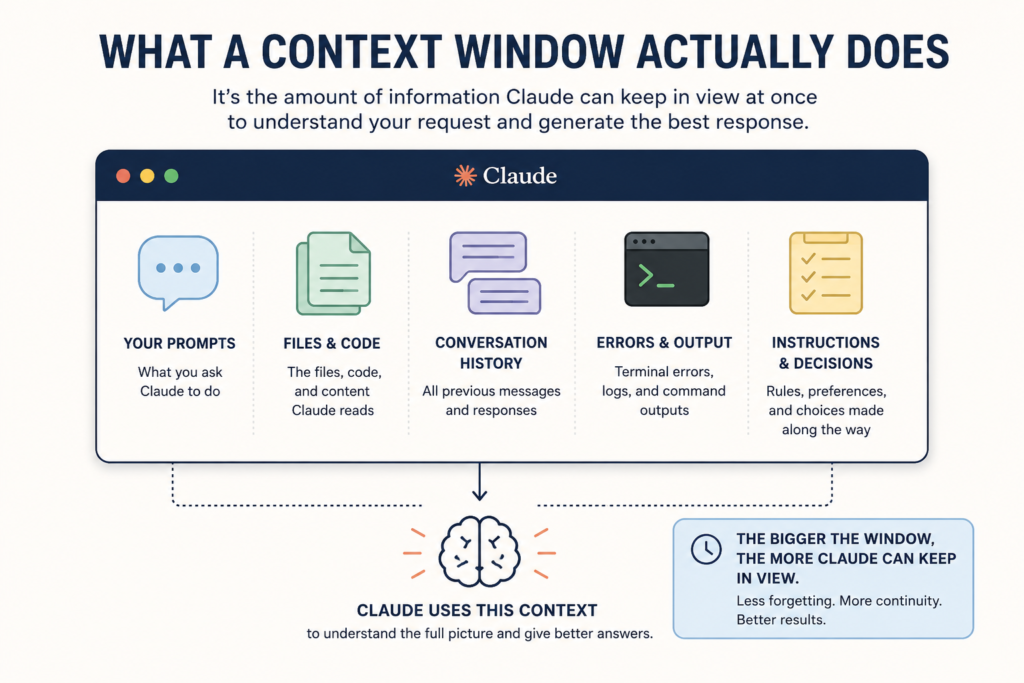
A context window is basically how much information Claude can keep in view at once.
Anthropic explains it as the space Claude uses for the conversation history, the current message, and the response it needs to generate. In normal words, it is the working space Claude uses to understand what is going on before it replies.
For a casual chat, that may not matter much.
But for coding, it matters a lot.
A Claude Code session can include your prompts, project files, code changes, terminal errors, package issues, instructions, previous decisions, and the history of what has already been tried.
All of that becomes part of the work.
So when people talk about a bigger context window, they are not just talking about a bigger chat box. They are talking about giving Claude more room to understand the project before it starts losing older details.
That is why the jump from 200K toward larger context windows matters more for developers than it may matter for someone asking a few simple questions.
Why Compaction Is More Than An Annoying Interruption
Because the old 200K context window could still fill up during long coding sessions, Claude Code needed a way to keep the session going instead of just stopping when the limit was close.
That is where compaction comes in.
Anthropic explains that long conversations eventually approach context limits, and Claude Code can automatically compact the session as you get close to that limit. In simple terms, Claude takes the older parts of the conversation and turns them into a shorter summary, so there is more room to continue.
That is useful because without it, long coding sessions would hit a wall much faster.
But compaction also has a downside. A summary is not the same as the full conversation.
It can keep the main idea, but it may not preserve every small decision, every warning, every rejected approach, every error message, or every instruction that shaped the work earlier.
So the problem with compaction is not just that it pauses the work. The bigger problem is that after compaction, Claude may be working from a thinner version of the project history.
For casual work, that may not matter much. For development, it can matter a lot.
What Claude’s Bigger Context Window Actually Helps Fix
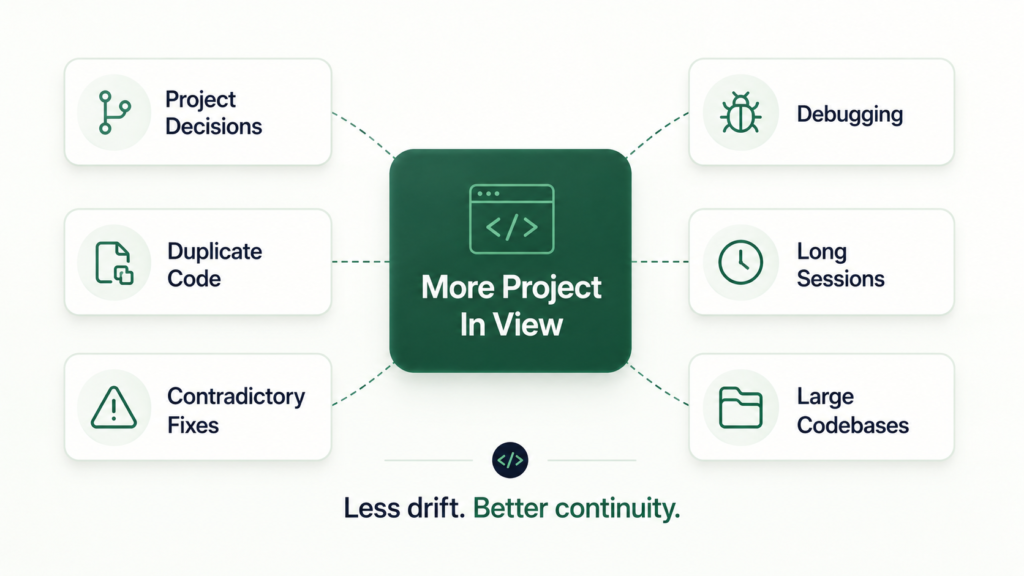
Anthropic says Claude Code can now support a 1 million-token context window on supported models and plans. It also says Claude Code shows how full the context window is, and when that window fills up, Claude can no longer see the oldest parts of the conversation clearly.
So, what does the bigger context window do for you?
1. It Helps Claude Remember Earlier Project Decisions
A coding session is full of decisions that may not look important at first.
- Use this folder.
- Do not rename that field.
- Follow this naming pattern.
- Keep this screen connected to the existing sync logic.
- Do not create another helper because one already exists.
These are the kinds of details that keep a project consistent.
When the context gets weak, Claude may still remember the general task, but forget the exact decision that shaped the task. That is how it can end up suggesting something you already rejected or changing something you already agreed to leave alone.
A bigger context window gives Claude more room to keep those decisions in view for longer.
That does not mean it will never forget anything, but it reduces the chance that the assistant keeps making you repeat the same project rules over and over again.
2. It Reduces Duplicate Code
Duplicate code is one of those problems that can sneak into a project quietly.
Claude may create a new helper because it forgot there was already one. It may build a new component because it no longer has the existing component structure in view. It may rewrite validation logic, storage logic, API logic, or state logic that already exists somewhere else.
At first, that may not look like a big issue.
The feature may work.
But over time, the codebase becomes harder to maintain because the same idea now exists in different places.
A larger context window helps Claude check more of the project before adding something new.
That matters because good AI coding is not just about producing code fast. It is about producing code that fits what is already there.
3. It Reduces Contradictory Fixes
One of the frustrating things with AI coding is when the assistant fixes one thing and breaks another.
This can happen when it only has part of the project in view.
For example, Claude may update one screen without fully remembering the shared component that screen depends on. It may change a database field in one place but miss the other files using the same field. It may fix a UI issue while weakening the logic behind it.
That is not always because the model is bad.
Sometimes, it is because the model is working with an incomplete view of the project.
Anthropic’s own Sonnet 4.6 announcement says the 1 million-token context window is enough to hold entire codebases, long contracts, or dozens of research papers in a single request. For developers, that matters because a codebase is connected. A change in one place can affect many other places.
A bigger context window gives Claude a better chance of seeing those connections before it starts editing.
4. It Makes Debugging Less Messy
Debugging is not just about seeing the latest error. It is about knowing the sequence.
- What changed before the error appeared?
- Which command already failed?
- Which fix was already tried?
- Which file was edited before the second issue showed up?
- Which warning looked harmless but may actually matter?
When Claude loses that history, debugging can become messy.
It may start guessing from the current error instead of following the full trail. That is when you get patch after patch, but the real issue is still hiding underneath.
A bigger context window helps Claude keep more of the debugging trail in view.
That makes it easier for the assistant to connect the current problem to what happened earlier in the session.
5. It Makes Long Claude Code Sessions Less Fragile
Claude Code is different from a normal chat because it is not just answering questions.
It can read files, edit files, run commands, inspect errors, and continue working through a task across many steps. Anthropic describes Claude Code as a coding tool that gives you access to Claude models in your terminal or supported IDE, where you can delegate complex coding tasks while still keeping control.
That kind of workflow needs continuity.
If Claude loses too much context halfway through, the session may continue, but it becomes easier for the work to drift. It may forget why a file was changed, what the original plan was, or which part of the task is already complete.
A bigger context window gives long Claude Code sessions more breathing room before that starts happening.
If you are still comparing AI coding tools, my Claude Code vs Codex comparison gives more context on how these tools feel in real development work.
6. It Helps With Larger Codebases
A 200K context window sounds huge until you are working inside a real project.
A serious project can include screens, components, hooks, database schemas, API routes, utility files, package files, styling rules, terminal outputs, and instructions from earlier in the session.
That fills up faster than people think.
Anthropic has also described the 1 million-token window as large enough to work with entire codebases. That is the part that makes this useful for developers, not just people who want longer chats.
The bigger the codebase, the more Claude needs room to understand how things connect.
A larger context window does not guarantee perfect understanding, but it gives Claude more space to see the system before making changes.
And that is the point.
The real benefit is not just that Claude can keep going for longer. It is that Claude can keep going with more of the project still in view.
Final Takeaway: This Is About Reliability, Not Just Convenience
The move from 200K toward larger context windows matters because it gives Claude more room to keep the real project in view.
That is the main point.
Yes, fewer interruptions are nice. Nobody enjoys stopping in the middle of a coding session because the conversation needs to be compacted.
But the bigger benefit is reliability.
When Claude can see more of the project history, it is less likely to lose earlier decisions, repeat old mistakes, create duplicate code, or fix one thing while quietly breaking another.
Anthropic’s own Claude Code guidance says that when the context window fills up, Claude can no longer see the oldest parts of the conversation clearly, and quality drops.
That explains why this change is crucial, because a larger context window does not make Claude Code flawless.
But it can help Claude keep the project’s logic, history, and direction in view for longer.
And when you are using AI to build software, that is more important than simply being able to chat for longer.